Everything a host can do on BookNoFees
One page, every function: what it is, what it does with the exact numbers, and where you find it. No marketing, no promises.
The listing in thirty seconds
What it is: Ten screens that ask only what nobody else can answer for you: the kind of place, whether guests get all of it, the address, the map pin, guests and beds, amenities, photos, three highlights, the price, and a review.
What it does: Every step is saved as you go; you can stop and carry on later, and the site reminds you of an open draft. Title and description are written for you from your answers, discounts are preset (10 % from 7 nights, 20 % from 28), house rules and check-in times get sensible defaults. Everything can be changed afterwards in your account.
Where: Start a listing
Photos
What it is: Up to 20 photos per listing, 8 MB each; JPEG, PNG, WebP, HEIC and AVIF all work. The first photo is the cover.
What it does: Photos are shrunk in your browser to 1600 pixels and the location your phone writes into the file is stripped before upload. Five photos are needed to publish; eight are recommended. Drag to reorder, the cover decides whether anyone taps the card.
Title, description and languages
What it is: The text of your listing: a title, a description, and their translations into every language BookNoFees speaks.
What it does: If you write nothing, the description is written from your answers and the photos, and the title from what makes your place special. A title you typed yourself is never touched; you can lock it. The web address is made from the English title once, at publication, and never changes afterwards. Guests in every country read the listing in their language.
The price, and what guests see
What it is: Your price per night is the amount you receive. Guests see it plus 3.9 %, which covers the cost of the payment and of refunds; BookNoFees earns nothing from it.
What it does: Cleaning fee: one rate, or a lower one for short stays and a higher one from a number of nights you choose. Extra guests: the price covers everybody, or a number of guests and then a fixed sum or a percentage per extra guest, per night or per stay. Pets: allowed or not, up to a number, with a fee per pet. Children can be free up to an age you set.
Pricing rules and seasons
What it is: The rules that change the nightly price by date or length of stay: minimum stay, short-stay surcharge, weekend surcharge, weekly and monthly discounts, early-booking discount, seasons, and prices for single dates.
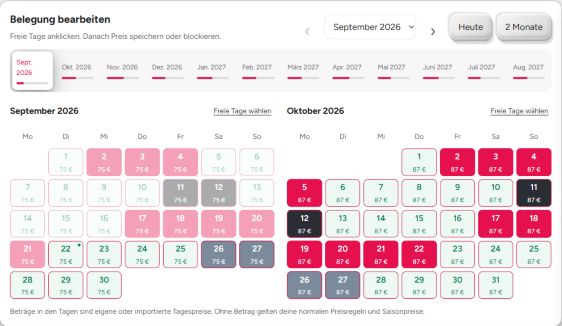
What it does: Minimum stay from 1 to 90 nights; below it guests may still book with a surcharge you set as a percentage or a flat sum. Weekend surcharge on Friday and Saturday nights. Weekly discount from 7 nights, monthly from 28; only the largest discount ever applies. Early-booking discount for bookings a chosen number of days ahead. Seasons: up to 20 periods with a percentage of your base price (100 % is the base, 150 % is high season), a name of your choice; where seasons overlap, the highest wins. A price on a single date in the calendar replaces everything else for that night.
Where: My listings, open a listing, Pricing rules and Calendar
Calendar and other portals
What it is: Your occupancy: bookings here, dates you block, and the calendars of Airbnb, Booking.com, Vrbo and others connected by their iCal address.
What it does: Blocked dates for own use or a booking made elsewhere. A connected calendar is read regularly; when a portal has not been read for 3 hours the listing shows it, after 24 hours instant booking pauses until it is read again, so no week is sold twice. Your BookNoFees calendar has its own address to paste into the other portals. Several identical rooms cannot sync external calendars.
Where: My listings, open a listing, Calendar
Bookings, cancellation, house rules
What it is: How a stay comes about: a request you confirm, or instant booking; plus the deposit, the house rules, directions, the guest handbook, checkout instructions and how guests get in.
What it does: A request reaches you with the card already secured; you have 48 hours to accept or decline, and the guest pays nothing until you accept. Instant booking is offered once three stays have gone through cleanly. A flexible-cancellation option lets guests cancel up to 24 hours before check-in for 10 % more, half of which goes to you. A deposit is settled between you and the guest; BookNoFees never holds it. Directions and entry details are shown to guests only after acceptance.
Where: My listings, open a listing, Booking and cancellation
Family and Friends
What it is: A private listing: not on our search or start page, not indexed by search engines, reachable only by its link or QR code.
What it does: For a place you rent to people you know. Bookings are final, there is no cancellation right, and 6.9 % of each booking is deducted from the payout, unlike the 0 % of a public listing. You apply in the listing, we confirm by hand, and you can make the listing public again at any time. A private listing never has instant booking.
Several identical rooms
What it is: One listing for a number of rooms of the same kind, as in a guesthouse or a small hotel: up to 50.
What it does: The calendar counts rooms instead of nights: a date is free while a room is left. External calendar sync is off for such a listing, because iCal carries dates, not quantities; you block dates by hand.
Where: My listings, open a listing, Multiple identical rooms
Messages and questions
What it is: One inbox for guests, hosts and our support. Guests can ask you a question before they book.
What it does: A question from a listing page lands in your inbox; contact details stay hidden until a stay is paid. You are told by email about a new message (you can switch that off), and the phone app shows it on the lock screen. The support conversation with us is the same inbox.
Where: Messages
Payouts and earnings
What it is: Your money goes to your bank account through Stripe; BookNoFees never sees your IBAN and takes no commission.
What it does: A payout arrives 48 hours after the guest has checked in; your first three stays pay one day after checkout. The bank details are set up once in two minutes, the account country cannot be changed later. Your earnings show what is on the way and what has been paid out.
Where: My listings, Your earnings
Reviews and how we rank
What it is: Guests review a stay after it ended; the order of search results follows published rules and never a payment.
What it does: Results are ordered by fit, distance, how often signed-in guests saved a place, the host profile (a photo of yourself and the languages you speak rank ahead) and the price. Payments, other sites, how long you have been here and how many listings you have play no part. Should paid placements ever exist, they will be marked as advertising and you will hear about it 15 days ahead.
Where: How we rank
Your host profile
What it is: What guests learn about you: a photo of yourself, what you do, the languages you speak, where you live, your decade of birth, whether you list privately or as a business, pets.
What it does: Only completed details appear on your published listings. A confirmed email address shows a verification mark on your listing; it means exactly that. The photo and the languages count in the ranking.
Where: Profile, Personal info
Fast import from another portal
What it is: Paste the link of your listing on Airbnb, Booking.com, Vrbo, Holidu, Traum-Ferienwohnungen or Ferienhausmiete, and confirm it is yours.
What it does: The page is read, the facts and photos are taken over, a fresh title and description are written, and you land on the review step. The nightly price is transferred without the portal’s guest fee (85 % of the shown price for Airbnb and Booking.com, 90 % for Vrbo). The calendar link is not imported; you connect it yourself. Five imports per day.
Where: Start a listing, Fast import
Your listings at a glance
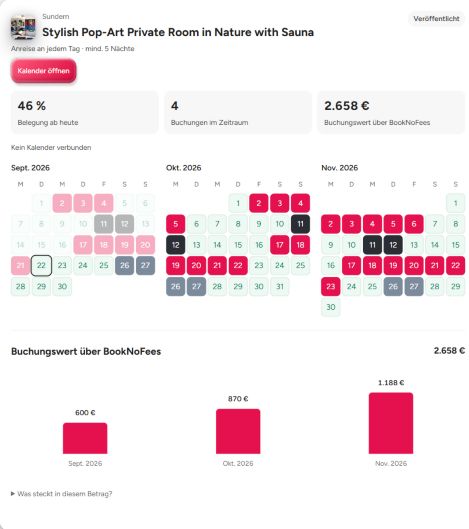
What it is: See all places as cards or in the split view. Choose 3, 6 or 12 months to compare occupancy, bookings and booking values for that period.
What it does: Filter for listings that need attention or are under-booked, see the next arrival, bookings and occupancy, read all calendars again with one button, copy a listing (photos included, calendar not), withdraw or delete one. Drafts, listings in review and published ones are marked.
Where: My listings
Currency
What it is: Prices are set and charged in euros. Every visitor sees them in their own currency.
What it does: The conversion is for display, at daily rates; the guest pays in euros and the amount on their statement is the euro amount. Your fields are always in euros.
Where: My listings
The numbers on this page are the ones the site works with. When a rule changes, this page changes with it.